For doctors on rotation in the NHS
Never manually input your rota again
RotaSync reads your hospital's rota spreadsheet, finds you among your colleagues, and syncs your shifts straight to your personal calendar. As swaps, leave and other shift changes are added to your rota spreadsheet, they sync to your personal calendar on their own. Works with a live Google Sheet, an Office 365/SharePoint link, or a plain Excel file.
Free 30-day trial, no card needed · set up in about 90 seconds
Built for doctors' rotas. Anyone with a spreadsheet rota is welcome too.
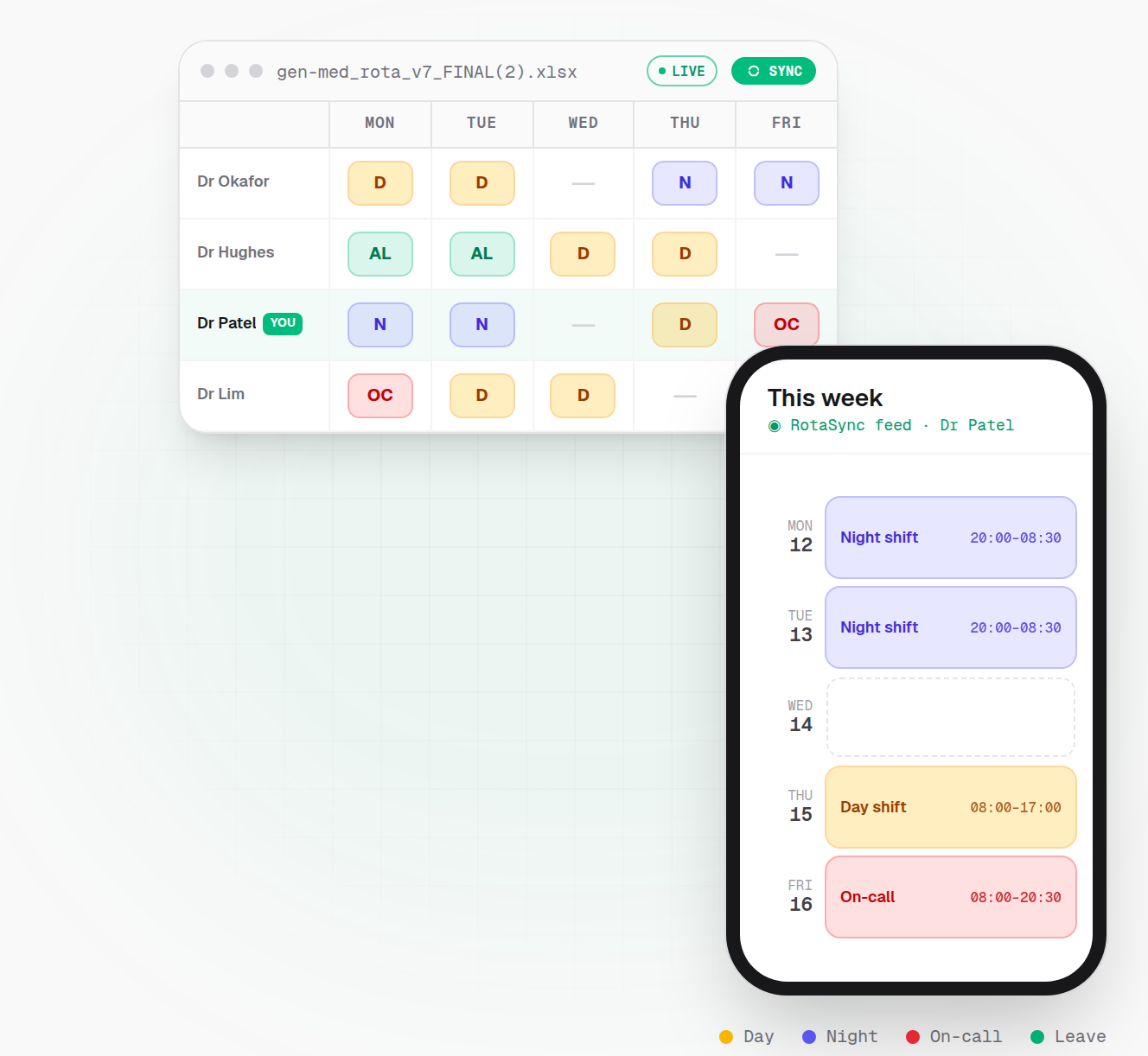
Live demo: the spreadsheet is your department's rota, and the highlighted row is you. One sync fills your personal calendar, and when a swap lands on the sheet your calendar updates itself.
🔒 We never keep a copy of your rota spreadsheet
We hold the whole spreadsheet for a few minutes whilst we read your shifts, then delete it. The only thing we store is a list of your own shifts.
How it works
Set it up once. Forget it exists.
Three steps, about ninety seconds, and you never open the rota spreadsheet again.
- 1
Link your rota spreadsheet
Paste the link to your department's rota on Google Sheets or Office 365/SharePoint and RotaSync reads it live. No link to paste? Simply upload the spreadsheet yourself, or email it in to a private address unique to your account.
- 2
We find your shifts
Every department formats its rota differently, so RotaSync doesn't expect a template. It works out where the dates, names and shift codes sit on your sheet, finds you among your colleagues, and turns your shifts into real calendar events with the right times.
- 3
Sync to your calendar
One tap syncs your shifts to Apple, Google or Outlook, and it works with any other calendar app too. After that, swaps, approved leave and rewritten rotas arrive on their own.
Want the details? Read the docs →
Pay and safe working
Check your pay and your safe-working hours
A rota checker and a pay calculator both need to know every shift you work, which is why they start by asking you to type them all in. RotaSync already has them.
So it checks your work pattern against the safe-working limits in the doctors' contracts, and prices those same shifts on the published pay scales, gross and take-home.
Compliance & Pay
How is this worked out? →Estimated from the shifts on your own rota against the doctors' contract for your nation, not a guarantee.
Safe-working compliance
Only 10.0h rest between shifts; the minimum is 11h.
Wed 3 Jun, 14:00-23:00: TW
5 consecutive nights worked; the limit is 4 before a minimum 46h rest.
Mon 8 Jun, 20:30-08:30 (+1): N
And 1 more on this example rota.
These are indicative checks against published safe-working limits, computed from what your rota says, not a determination that a limit was or wasn't breached in practice.
Expected pay
Priced at 2026/27 rates.
Gross / year
£88,092
£7,341/month
Net / year
£52,045
£4,337/month
This rota averages 42.3 hours a week.
A worked example: an invented rota, run through the same engine your own rota goes through.
Put in the work schedule your trust pays you on and the two are priced side by side. Pay and compliance come with any paid plan: on the free trial RotaSync tells you how many possible issues it spotted on your rota, and a paid plan shows you which, and what the shifts are worth. How both are calculated →
Simple, transparent pricing
Every plan starts with a free 30-day trial, no card needed. Cancel anytime. Choose the plan that fits your schedule.
Free Trial
Free 30-day trial, no card needed. Ideal if you just want to try it out.
£0/no card needed
- Link a live rota or upload a spreadsheet
- Sync it to Apple, Google, Outlook or any other calendar app
Monthly Plan
Perfect for ongoing or permanent staff. Automatically updates monthly.
£1.99/month
£1.99 billed monthly
- Live sync to your calendar app: Apple, Google, Outlook or any other
- Rota compliance checker for the doctors' contracts, so you can see your shifts meet safe working hours
- Expected pay from your rota, gross and take-home, LTFT included, so you can check you are paid what you are owed
- Compare what you actually work against the work schedule your trust pays you on
6-Month Rotation
Covers a full 6-month rotation. One payment, no subscription, never renews. That's 25% less than paying monthly.
£1.49/month
£8.94 once, for 6 months. Never renews.
- Live sync to your calendar app: Apple, Google, Outlook or any other
- Rota compliance checker for the doctors' contracts, so you can see your shifts meet safe working hours
- Expected pay from your rota, gross and take-home, LTFT included, so you can check you are paid what you are owed
- Compare what you actually work against the work schedule your trust pays you on
Annual Plan
A full year of RotaSync. Renews yearly, and we email you before it does. That's 33% less than paying monthly.
£1.33/month
£15.99 billed yearly
- Live sync to your calendar app: Apple, Google, Outlook or any other
- Rota compliance checker for the doctors' contracts, so you can see your shifts meet safe working hours
- Expected pay from your rota, gross and take-home, LTFT included, so you can check you are paid what you are owed
- Compare what you actually work against the work schedule your trust pays you on
Why two rotas, and not one?
Most people only ever need one. Two is there for the weeks when one isn't enough: you're covering more than one site, or you're at the end of a rotation and the next one is already out on a different sheet. So every plan covers 2 linked rotas and 2 uploaded spreadsheets at the same time, and they all merge into the one calendar link you already added. Nothing to re-add and no second plan to buy, and you can swap any of them for a new rota whenever you rotate.
FAQ
How quickly do changes reach my calendar?
Honestly: it depends on your calendar app. RotaSync re-reads your rota whenever your calendar asks for it, but your calendar app decides how often it checks. Apple Calendar and Outlook typically check every few hours (and you can refresh manually), while Google Calendar can take longer. If you connect Google Calendar in the dashboard, RotaSync pushes changes into it directly, which is usually much faster. Either way you never type a shift: swaps, leave and any other changes to your rota flow through on their own.
Do you keep a copy of my rota?
No. A linked rota is read fresh each time your calendar updates, and both linked and uploaded rotas pass through a short-lived processing cache for up to 30 minutes while you finish setting it up, and are then deleted. What we keep is your own extracted list of shifts, so your calendar keeps working even if the rota is briefly unreachable, plus your settings and a short technical description of the spreadsheet's layout. The privacy policy sets out the lot.
I'm not a doctor. Can I use RotaSync?
Yes. RotaSync is built for doctors' rotas first, and the compliance and pay features are specific to the UK resident doctor contracts. But the rota-reading engine works for anyone whose rota lives in a spreadsheet: nurses, AHPs, pharmacists and other shift workers use it too.
Are the pay and compliance checks part of the free trial?
They need a paid plan. The 30-day trial gives you the calendar sync, and it tells you how many possible safe-working issues were spotted on your rota; a paid plan shows you which ones and what your shifts should pay you, gross and take-home. Both are indicative estimates worked out from what your rota says, not a determination and not financial advice. The compliance side only ever raises flags, so finding nothing means nothing was found, not that a rota has been certified as safe. How each figure is calculated, and what can make one wrong, is written up in full in the docs.
What rota formats and layouts work?
A Google Sheets or Office 365/SharePoint rota link syncs live; Excel and CSV files can be uploaded, and you can email an updated file to your personal RotaSync address. Every department formats rotas differently. Our system is built for exactly that, and when a rota can't be read reliably it tells you why and how to fix it, rather than guessing.
What happens when the free trial ends?
Nothing is charged. The 30-day trial needs no card, so there's nothing to auto-bill. Your calendar simply stops receiving new shifts until you pick a plan (£1.99/month, £15.99/year, or a one-off £8.94 six-month pass that isn't a subscription). Your rota links and settings are kept, so upgrading picks up right where you left off.
If I buy partway through my trial, do I lose the rest of it?
No. Whatever you buy is added to the end of the access you already have, so nothing is wasted. If you have 30 days of trial left and buy the six-month pass, you get those days and then six months. Buy another pass later and it goes on the end of that. Subscribing works the same way: your first payment is taken on the day your trial would have ended, not on the day you subscribe. The free trial itself runs once, for 30 days from when you sign up, and buying a plan never restarts it.
Something else? Email [email protected] →